
fw.explore
Use fw.explore when you have a new dataframe and need a first set of questions to ask. It runs four independent sections, availability, dependencies, suggested browsing orders, and value patterns, and ranks their findings as leads to investigate.
Choose explore for reconnaissance. Once you know which dimensions matter, use profile to compose counts, a census, candidate grain, and pair evidence around that order. Follow a promising lead with its dedicated function when you need control over its search budget or thresholds.
Jump to the worked example or the argument reference.
Function reference
Section titled “Function reference”fw.explore( df, *, features=None, by=None, entity=None, unit="rows", entity_presence="any", sections=None, options=None, scope=None, missing=None, table_id="table", progress=None, cancel=None, timeout=None, safe_errors=None,)This page describes Fieldwork 0.3.2. Import the package with import fieldwork as fw. View the documented source.
Arguments
Section titled “Arguments”| Argument | Type / default | Effect |
|---|---|---|
df |
pandas.DataFrame; required | The source table. Analysis preserves its values and row order; column labels are identified by their string form, which must be unique. |
features |
iterable of str or None; None |
Columns every section analyzes. None selects all columns, skipping (and listing in skipped_features) columns whose cells have unsupported types such as lists, dicts or Decimal. |
by |
iterable of str or None; None |
Context columns for the availability, dependency and value-pattern sections. Path search does not use them. |
entity |
str, iterable of str, or None; None |
Entity key columns for the availability section; see missingness. Other sections always count rows. |
unit |
“rows” or “entities”; "rows" |
Counting unit of the availability section. "entities" requires entity. |
entity_presence |
“any” or “all”; "any" |
With unit="entities", count an entity as populated when any of its rows is, or only when all are. |
sections |
iterable of str or None; None |
Sections to run, from missingness, dependencies, paths, and value_patterns; None runs all four. Omitted sections are marked not_requested. |
options |
mapping or None; None |
Per-section options (fieldwork.typing.SectionOptions) overriding the overview’s defaults, for example {"paths": {"objective": "availability"}}. Only requested sections may be configured. Each section’s budgets go under its own limits and merge with the overview’s defaults key by key. Source context and runtime controls cannot be set here. |
scope |
Scope or None; None |
A saved row selection tied to this dataframe; None uses every row. Every section analyzes the same rows. |
missing |
mapping or None; None |
Additional missing-value sentinels per column, such as {"score": [-999]}. The source is not modified. |
table_id |
str; "table" |
Table name recorded in feature references. |
progress |
bool or callable; None |
Silent by default; True displays progress, or pass a synchronous ProgressEvent callback. See runtime controls. |
cancel |
CancellationToken or None; None |
Cooperative cancellation token; cancellation raises AnalysisCancelled without returning a partial result. |
timeout |
float or None; None |
Finite nonnegative seconds from call start; None disables the cooperative deadline. A running pandas/NumPy work item must finish before cancellation. |
safe_errors |
bool or None; None |
True raises any other failure as AnalysisError, naming the operation, phase and column without echoing the original message, which can quote cell values. See runtime controls. |
Section options
Section titled “Section options”Each entry of options accepts its section’s own arguments, except the shared ones above:
paths: the suggest_paths arguments, such asobjective,start_with,before,exclude,target,max_dimensions,n_paths, andlimits.missingness: the missingness thresholds andlimits.dependencies: the discover_dependencies arguments, such asmax_key_size,min_accuracy,dropna,include_grain, andlimits.value_patterns: the value_patternslimits.
For example, sections=["missingness", "dependencies"] with options={"dependencies": {"include_grain": False, "limits": {"max_candidates": 5}}} runs two sections, bounds the dependency search, and skips grain graphs. Setting one budget keeps the overview’s other defaults.
Returns and output choices
Section titled “Returns and output choices”Returns a fieldwork.Result with kind="overview" (schema 2.0). sections holds each section’s complete result; overview.section(name) returns one as a Result. leads ranks the sections’ findings, and overview.findings resolves them, in rank order, to full finding records with overview IDs: f0 is the most promising, and each carries lead.score and a short lead.reason. The score orders findings; it is not a probability. An approximate dependency ranks as a “near-rule with exceptions” only when its repeated determinant groups cover at least a quarter of the evaluated rows and follow the rule in at least 90% of them; otherwise its accuracy rests mostly on one-row groups, which cannot disagree, and it ranks low as a “near-rule with sparse repeated support” (see repeated consistency). inspect, select, and to_frame() use these overview IDs, while each section keeps its own IDs and order.
overview.best is the first suggested census path, or None; overview.best.census(df) counts it on the same rows and missing conventions. relationships() links features to supporting evidence, and feature_network records the same links. An overview can mix row and entity units: inspect the owning section’s denominator.
Use plaintext for a text report, SVG for a static figure, or HTML for a shareable report. to_dict() retains analytical evidence; visualization_data provides the labels and values used to draw a figure.
Interpretation and boundaries
Section titled “Interpretation and boundaries”The overview deliberately uses a small dependency search (single-column keys and 20 candidates) and value-pair search (20 pairs). Other settings use their dedicated function defaults. Changing path-search options does not change the other sections’ budgets. This overview is a starting point, not an exhaustive test of every possible relationship; work skipped by a budget is recorded in each section’s coverage.
All analyses preserve the source. Unknown columns raise KeyError; incompatible configurations raise TypeError or ValueError. Naming a column with unsupported cell types in features raises TypeError.
Walkthrough: why are service-request photos missing?
Section titled “Walkthrough: why are service-request photos missing?”A municipal operations team receives a combined delivery from an app, a phone desk, and a web form. Only a third of the records contain an attachment. Before treating that as an upload problem, the team needs to understand which kinds of request arrive through each channel.
explore helps when the useful dimensions are still unknown. The complete runnable example follows the same steps, and the profile walkthrough continues the investigation with explicit dimensions.
Build a delivery small enough to audit
Section titled “Build a delivery small enough to audit”These twelve synthetic rows each represent one request. Every channel contributes four requests; six concern potholes and six concern lighting. None means the field was not populated in this delivery. It does not tell us whether the source form offered that field or whether a resident chose to leave it empty.
import pandas as pdimport fieldwork as fw
requests = pd.DataFrame(    [        ("app", "pothole", "north", "closed", "photo", None),        ("app", "pothole", "north", "closed", "photo", None),        ("app", "pothole", "south", "open", "photo", None),        ("app", "lighting", "south", "open", None, None),        ("phone", "pothole", "north", "closed", None, "callback"),        ("phone", "pothole", "south", "open", None, "callback"),        ("phone", "lighting", "north", "closed", None, "callback"),        ("phone", "lighting", "south", "open", None, "callback"),        ("web", "pothole", "north", "closed", "photo", None),        ("web", "lighting", "north", "closed", None, None),        ("web", "lighting", "south", "open", None, None),        ("web", "lighting", "south", "open", None, None),    ],    columns=[        "channel",        "service",        "district",        "status",        "attachment",        "callback",    ],)requests.insert(0, "request_id", range(1001, 1013))
attachment records the presence of a photo, while callback records a request for a return call. The repeated values are categories, not file names or phone numbers. The unique request identifier remains in the delivery but is excluded from the exploratory feature set: splitting on it would give every request its own branch.
Ask for an overview
Section titled “Ask for an overview”Give the overview the six descriptive columns and leave out the identifier. Configure the path section to prefer orders that separate patterns of populated fields, with at most two dimensions so that the first inspection stays manageable.
features = [ "channel", "service", "district", "status", "attachment", "callback",]overview = fw.explore( requests, features=features, options={ "paths": {"objective": "availability", "max_dimensions": 2} },)availability = overview.section("missingness").to_frame("availability")print( availability[["feature", "populated", "denominator"]].to_string( index=False )) feature populated denominator channel 12 12 service 12 12 district 12 12 status 12 12attachment 4 12 callback 4 12The overview combines missingness, dependency discovery, suggested paths, and value patterns. The availability table uses all twelve rows as its denominator. Both optional fields are populated in four rows, but equal totals do not imply that they occur together.
Read the ranked leads
Section titled “Read the ranked leads”overview.findings lists the sections’ findings in lead order. Print the first few with the reason each was ranked there:
for finding in overview.findings[:4]: print( finding["id"], finding["statement"], "|", finding["lead"]["reason"], )f0 attachment and callback are mutually exclusive | columns never populated togetherf1 district and status: equivalent value partitions | equivalent encodingsf2 attachment: populated in some rows | column is partially populatedf3 callback: populated in some rows | column is partially populatedThe top lead answers the first question: the equal totals are disjoint. No request has both a photo and a callback. In this small delivery, district and status also split the rows identically, so one of them adds nothing to a census. Leads are prompts for inspection, not conclusions; overview.inspect(requests, "f0") returns example rows behind the first one, and all_matches=True returns all of them.
Follow the first suggested split
Section titled “Follow the first suggested split”overview.best is the highest-ranked census path. Count it on the same rows:
print(overview.best.dimensions)print(fw.render_plaintext(overview.best.census(requests)))('channel', 'attachment')Fieldwork · censusCensus (computed) Input population · 12 evaluated / 12 input rows · 0 missing, 0 restricted exclusions path: channel > attachment total: 12 rows channel=app: 4 rows attachment=photo: 3 rows attachment=<NA>: 1 row channel=phone: 4 rows attachment=<NA>: 4 rows channel=web: 4 rows attachment=<NA>: 3 rows attachment=photo: 1 rowThe suggestion is channel → attachment. Photos appear in three of four app requests, none of four phone requests, and one of four web requests. Missing values remain visible as <NA> branches; the tree accounts for all twelve requests.
This makes intake channel a useful place to look. It does not establish a channel policy, and the first recommendation is the best returned by this configured search, not proof that every possible ordering has been examined. To compare the service mix inside each channel, continue with an explicit breakdown in profile.
Choose a view for the conversation
Section titled “Choose a view for the conversation”A figure makes the suggested split easy to compare, while an HTML report lets a colleague open the overview’s saved evidence. Both are generated from saved results:
figure = fw.render_svg(overview.best.census(requests))report = fw.render_html(overview, max_findings=12)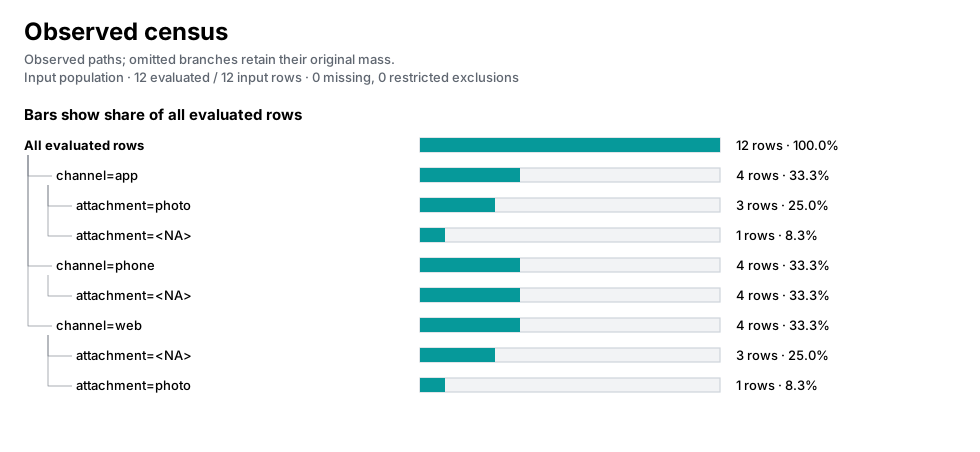
The bars show each prefix’s share of all twelve requests. Read the nested labels to compare photos within a channel; a bar’s length is not a within-parent percentage.
Open the native overview report to expand the saved findings. max_findings=12 keeps that report compact without changing the underlying overview. These calls return strings. The export step below saves them as SVG and HTML files. Use overview.to_dict() when you need the analytical evidence for later inspection rather than a report view.
Save the result for sharing
Section titled “Save the result for sharing”Save the figure or report in your working directory:
from pathlib import Path
Path("explore.svg").write_text(figure, encoding="utf-8")Path("explore.html").write_text(report, encoding="utf-8")
Continue exploring
Section titled “Continue exploring”fw.profile, fw.missingness, fw.discover_dependencies, fw.suggest_paths. See results and configuration for serialization and result-method contracts.