
fw.joint_counts
Use fw.joint_counts once you have a specific pair to examine. It exposes the observed cell counts and the local row and column domains, optionally inside one context. A heatmap makes concentration and unobserved combinations visible.
Use pairs first for a broad relationship scan or for absence relative to declared domains.
Jump to the worked example or the argument reference.
Function reference
Section titled “Function reference”fw.joint_counts( df, dimensions, *, context=None, dropna=False, max_cells=2500, min_count=1, scope=None, missing=None, table_id="table", progress=None, cancel=None, timeout=None, safe_errors=None,)This page describes Fieldwork 0.3.2. Import the package with import fieldwork as fw. View the documented source.
Arguments
Section titled “Arguments”| Argument | Type / default | Effect |
|---|---|---|
df |
pandas.DataFrame; required | The source table. Analysis preserves its values and row order; duplicate column labels are rejected. |
dimensions |
iterable of exactly two column names; required | The two axes, in order. Non-string labels are matched by their string form; this function does not enumerate pairs from a longer list. |
context |
mapping or None; None |
Equality filters on other columns, such as {"branch": "north"}. Context columns must be disjoint from both axes; None uses the whole table. |
dropna |
bool; False |
False includes native missing as a level. True removes rows missing any axis or context value before applying the context. |
max_cells |
positive int; 2500 |
Maximum product of the two reported domain sizes, including zero cells. If exceeded, raises ValueError rather than silently truncating; narrow the context or deliberately raise the budget. |
min_count |
nonnegative int; 1 |
Small-cell threshold. Cells counting fewer rows are omitted, together with axis values that only omitted cells support; omitted_cells and omitted_rows report their mass. The evaluated population is unchanged. The default reports every observed cell. |
scope |
Scope or None; None |
A saved row selection tied to this dataframe; None uses every row. Construct with fw.Scope.from_positions(df, positions). Pass the original dataframe with its scope, rather than a reordered or changed copy. |
missing |
mapping or None; None |
Column names mapped to lists of sentinel values, for example {"bread": ["unknown"]}. Native nulls are always missing. Sentinels join the missing level of their column without replacing source values. |
table_id |
str; 'table' |
Nonempty table identity recorded with the evidence. It does not bypass source-fingerprint checks. |
progress |
bool or callable; None |
Silent by default; True displays progress, or pass a synchronous ProgressEvent callback. See runtime controls. |
cancel |
CancellationToken or None; None |
Cooperative cancellation token; cancellation raises AnalysisCancelled without returning a partial result. |
timeout |
float or None; None |
Finite nonnegative seconds from call start; None disables the cooperative deadline. A running pandas/NumPy work item must finish before cancellation. |
safe_errors |
bool or None; None |
True raises any other failure as AnalysisError, naming the operation, phase and column without echoing the original message, which can quote cell values. See runtime controls. |
Returns and output choices
Section titled “Returns and output choices”Returns a fieldwork.Result with kind="joint_counts" (schema 2.0). a and b are the local domains as plain values (None for missing); each sparse cells record uses integer indexes into these lists and a count. Missing cell records within those domains have zero observations. evaluated_rows, missing_excluded_rows, and restriction_excluded_rows count the analyzed rows, the rows excluded for missing values, and the rows outside the context. omitted_cells and omitted_rows count the cells and rows below min_count (zero by default); topology exports mark only that an omission happened. Like every result, it records source, scope, missing_convention, and parameters.
Use dictionary access for calculations, to_dict() for a JSON archive, plaintext for terminal output, SVG for a figure, or HTML for a report. recompute(df) reruns the analysis on the verified source with its saved settings.
Interpretation and boundaries
Section titled “Interpretation and boundaries”Axes include only levels supported inside the selected context, and with min_count only levels that a reported cell supports. An entirely absent level will not appear: this is not a declared-domain audit. With min_count, a blank position is either unobserved or below the threshold. The cell budget is a guard on the full reported domain product, even though evidence is stored sparsely.
The result counts rows, not distinct entities. Invalid dimensions, overlapping context, or an exceeded cell budget raise ValueError; unknown columns raise KeyError.
Walkthrough: three sourdough orders before lunch
Section titled “Walkthrough: three sourdough orders before lunch”A cooperative bakery packs orders for two market stalls. Someone asks: how many early-pickup sourdough orders belong to Saturday’s Quay stall? A global bread total will not answer that question. We need one cell in a pair of categories, restricted to a particular day and place.
The runnable example reproduces every output below. It also saves the heatmap in your working directory.
Build a small order ledger
Section titled “Build a small order ledger”These are synthetic orders. Every expanded row represents one order for one
loaf. The final number in each batch is a repetition count used to construct the
ledger; joint_counts counts the resulting rows, without using weights.
import pandas as pdimport fieldwork as fw
batches = [    ("Saturday", "Quay", "early", "sourdough", 3),    ("Saturday", "Quay", "early", "rye", 1),    ("Saturday", "Quay", "late", "sourdough", 2),    ("Saturday", "Quay", "late", "focaccia", 2),    ("Saturday", "Hill", "early", "rye", 2),    ("Saturday", "Hill", "noon", "focaccia", 2),    ("Sunday", "Quay", "early", "sourdough", 1),    ("Sunday", "Quay", "noon", "rye", 1),    ("Sunday", "Quay", "late", "focaccia", 2),]rows = []for day, stall, pickup, bread, count in batches:    for _ in range(count):        rows.append((day, stall, pickup, bread))
orders = pd.DataFrame(    rows,    columns=["day", "stall", "pickup", "bread"],)print(f"Orders: {len(orders)}")
Orders: 16Ask for the cell and its population
Section titled “Ask for the cell and its population”Both context predicates must match. The context columns are separate from the analyzed pair: pickup window and bread type stay on the two axes.
quay = fw.joint_counts( orders, ["pickup", "bread"], context={"day": "Saturday", "stall": "Quay"},)data = quay.to_dict()pickups, breads = data["a"], data["b"]observed = { (pickups[cell["a"]], breads[cell["b"]]): cell["count"] for cell in data["cells"]}print("Early sourdough orders:", observed[("early", "sourdough")])print( "Input / outside context / evaluated:", data["scope"]["input_rows"], data["restriction_excluded_rows"], data["evaluated_rows"],)Early sourdough orders: 3Input / outside context / evaluated: 16 8 8The answer is three orders. Eight of the sixteen ledger rows belong to this
stall on this day; the other eight are outside the context. There are no missing
values in this ledger. The a and b fields in each stored cell are indexes into
the returned axis lists, so resolve those indexes before assigning labels.
Expand the stored cells into a packing table
Section titled “Expand the stored cells into a packing table”Only observed combinations are stored in cells. Build a dense table over the
returned axes to see the unobserved combinations alongside the counts.
# Fill unobserved combinations only across the returned supported axes.table = pd.DataFrame(0, index=pickups, columns=breads)for (pickup, bread), count in observed.items(): table.loc[pickup, bread] = countprint(table.to_string())print("Stored cells / grid cells:", len(data["cells"]), table.size)svg = fw.render_svg(quay, view="heatmap") focaccia rye sourdoughearly 0 1 3late 2 0 2Stored cells / grid cells: 4 6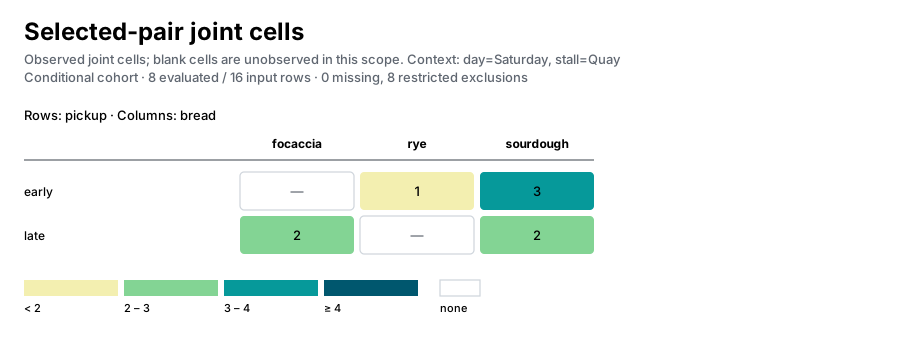
The table has six positions but only four observed combinations. Early focaccia and late rye have zero recorded orders in this scope. The native heatmap draws those two positions as empty cells marked with a dash. Neither representation establishes that those orders were impossible, unavailable, or refused: it describes this ledger.
Notice the pickup window that disappeared
Section titled “Notice the pickup window that disappeared”all_orders = fw.joint_counts(orders, ["pickup", "bread"])print("Global pickup domain:", all_orders["a"])print("Saturday Quay pickup domain:", pickups)print( "Early sourdough share: {:.1%}".format( observed[("early", "sourdough")] / data["evaluated_rows"] ))Global pickup domain: ['early', 'late', 'noon']Saturday Quay pickup domain: ['early', 'late']Early sourdough share: 37.5%Noon appears elsewhere in the ledger, but no Saturday Quay order supports that axis value. It is absent from this result, rather than present as an all-zero row. Domains are local to the selected context; comparing heatmaps by position alone would therefore be misleading. Match category labels first.
The three early sourdough orders are 37.5% of the eight selected orders. This is a share of all Saturday Quay orders, not a share among sourdough orders or among early pickups. The function supplies counts; the denominator above is our choice.
Budget for the grid, then recognize an empty context
Section titled “Budget for the grid, then recognize an empty context”A four-cell budget might look sufficient because four combinations are stored.
It is not: max_cells bounds the full supported Cartesian grid, including the
two unobserved positions. Exceeding the budget raises an error rather than
returning a partial count table.
try:    fw.joint_counts(        orders,        ["pickup", "bread"],        context={"day": "Saturday", "stall": "Quay"},        max_cells=4,    )except ValueError as error:    print(type(error).__name__ + ": " + str(error))
sunday_hill = fw.joint_counts(    orders,    ["pickup", "bread"],    context={"day": "Sunday", "stall": "Hill"},)print(    "Sunday Hill:",    sunday_hill["status"],    sunday_hill["a"],    sunday_hill["b"],    sunday_hill["cells"],)
ValueError: Selected pair exceeds max_cells; narrow the context or increase the budgetSunday Hill: empty [] [] []Sunday and Hill each occur in the ledger, but never together. Their intersection has no rows, so both domains and the cell list are empty. That is different from the two blank positions inside Saturday Quay’s populated grid.
Before changing the bake plan, the cooperative could check its pickup schedule: was noon offered at Quay on Saturday? Joining that planned availability to the order ledger would help distinguish an unused option from an option never offered. These observed counts alone cannot settle that question.
Save the result for sharing
Section titled “Save the result for sharing”Save the figure or report in your working directory:
from pathlib import Path
Path("joint_counts.svg").write_text(svg, encoding="utf-8")
Continue exploring
Section titled “Continue exploring”fw.pairs, fw.census, fw.levels. See results and configuration for serialization and result-method contracts.