
fw.levels
Use fw.levels to make an unfamiliar column concrete: which values appear, how often, and how much of the population a short list leaves out. Each feature is counted independently, so changing the order of features does not turn this into a hierarchy.
Use census for nested prefixes, or joint_counts for a selected two-way table.
Jump to the worked example or the argument reference.
Function reference
Section titled “Function reference”fw.levels( df, features=None, *, top_n=None, max_levels=100, min_count=1, dropna=False, schema=None, scope=None, missing=None, table_id="table", progress=None, cancel=None, timeout=None, safe_errors=None,)This page describes Fieldwork 0.3.2. Import the package with import fieldwork as fw. View the documented source.
Arguments
Section titled “Arguments”| Argument | Type / default | Effect |
|---|---|---|
df |
pandas.DataFrame; required | The source table. Analysis preserves its values and row order; duplicate column labels are rejected. |
features |
iterable of str or None; None |
Columns to count independently; None selects all. Non-string column labels are named by their string form, such as "0". |
top_n |
positive int or None; None |
Retain at most the most frequent N levels per feature. The denominator remains the complete eligible population; None disables this limit. |
max_levels |
nonnegative int or None; 100 |
Output cap per feature, applied after top_n and min_count. Zero emits no levels; None removes this cap. |
min_count |
nonnegative int; 1 |
Minimum count for a reported level. Smaller levels contribute to unreported mass and remain in the denominator. |
dropna |
bool; False |
False counts native missing as a level. True excludes missing rows independently for each feature, so different features can have different denominators. |
schema |
mapping or None; None |
Caller-supplied column roles: id, categorical, continuous, or unknown. Roles annotate evidence; they do not transform values or silently remove explicitly selected columns. |
scope |
Scope or None; None |
A saved row selection tied to this dataframe; None uses every row. Construct with fw.Scope.from_positions(df, positions). Pass the original dataframe with its scope, rather than a reordered or changed copy. |
missing |
mapping or None; None |
Extra missing-value sentinels per column, such as {"item": ["unknown"]}. Matching values join the native missing level; the dataframe is not changed. |
table_id |
str; "table" |
Name recorded in the result’s source so saved evidence says which table it describes. |
progress |
bool or callable; None |
Silent by default; True displays progress, or pass a synchronous ProgressEvent callback. See runtime controls. |
cancel |
CancellationToken or None; None |
Cooperative cancellation token; cancellation raises AnalysisCancelled without returning a partial result. |
timeout |
float or None; None |
Finite nonnegative seconds from call start; None disables the cooperative deadline. A running pandas/NumPy work item must finish before cancellation. |
safe_errors |
bool or None; None |
True raises any other failure as AnalysisError, naming the operation, phase and column without echoing the original message, which can quote cell values. See runtime controls. |
Returns and output choices
Section titled “Returns and output choices”Returns a fieldwork.Result with kind="levels". per_feature holds one record per feature: its column, evaluated_rows and missing_excluded_rows, ranked levels (each with rank, value, count, and share_of_feature), levels_total, reported_rows, and unreported_rows. share_of_feature divides a level count by that feature’s evaluated rows, not just displayed rows. Values are plain JSON: strings and numbers as themselves and missing as None. The result also records source, scope, missing_convention, and the parameters that produced it.
Use dictionary access for calculations, to_frame("per_feature") for a table of features, to_dict() for a saved copy, plaintext for terminal output, SVG for a figure, or HTML for a report. recompute(df, top_n=3) reruns the count on the same verified dataframe with changed options.
Interpretation and boundaries
Section titled “Interpretation and boundaries”Counts are exact over the eligible rows. Ties use a deterministic value order. Omitted levels are not combined into a fabricated category: their mass is explicit in unreported_rows. Empty populations produce None shares. Declared missing sentinels count as missing, so they join the <NA> level or, with dropna=True, are excluded.
Unknown columns raise KeyError; invalid limits raise ValueError.
Walkthrough: what came through the repair cafe?
Section titled “Walkthrough: what came through the repair cafe?”A volunteer repair cafe wants to prepare for its next Saturday session. Last time, lamps seemed to fill the benches, but the intake sheet also contains kettles, radios, toasters, and two unnamed objects. Before assigning volunteers, count what arrived and how the session ended.
This synthetic sheet has one row per intake, including items that could not be repaired. It measures recorded workload, not demand across the neighborhood. Download the runnable example to follow the same steps.
Build a small, auditable intake sheet
Section titled “Build a small, auditable intake sheet”The compact batches below expand into 20 individual records. None means the
volunteer left that field blank; it is not an item category or an outcome.
import pandas as pdimport fieldwork as fw
batches = [    ("lamp", "fixed", 5),    ("lamp", "waiting", 2),    ("lamp", "retired", 1),    ("kettle", "fixed", 3),    ("kettle", "waiting", 1),    ("kettle", "retired", 1),    ("radio", "fixed", 1),    ("radio", "waiting", 1),    ("radio", "retired", 1),    ("toaster", "fixed", 1),    ("toaster", "waiting", 1),    (None, "fixed", 1),    (None, None, 1),]rows = []for item, outcome, count in batches:    for _ in range(count):        rows.append((item, outcome))
intake = pd.DataFrame(    rows,    columns=["item", "outcome"],)
Count each feature independently
Section titled “Count each feature independently”Ask for both features and retain every observed level. The text renderer labels blank values as <NA> and keeps the two columns’ counts separate.
inventory = fw.levels( intake, features=["item", "outcome"], max_levels=None)print(fw.render_plaintext(inventory))Fieldwork · levelsLevels (computed) item: 5/5 levels; 20/20 evaluated rows reported lamp: 8 rows kettle: 5 rows radio: 3 rows toaster: 2 rows <NA>: 2 rows outcome: 4/4 levels; 20/20 evaluated rows reported fixed: 11 rows waiting: 5 rows retired: 3 rows <NA>: 1 rowLamps account for eight of the 20 intakes. Eleven objects were fixed. These are
separate counts: levels has not counted combinations of item and outcome.
Check that distinction against the source rows:
fixed_lamps = int( ((intake["item"] == "lamp") & (intake["outcome"] == "fixed")).sum())print("Fixed lamps:", fixed_lamps)Fixed lamps: 5Five fixed lamps belong to both totals. To compare outcomes within each item
category, continue with fw.census(intake, dimensions=["item", "outcome"]).
Put the two ranked lists beside the planning notes
Section titled “Put the two ranked lists beside the planning notes”The native bars renderer keeps the two features separate and includes their population information. Generate the figure from the same result:
svg = fw.render_svg(inventory, view="bars")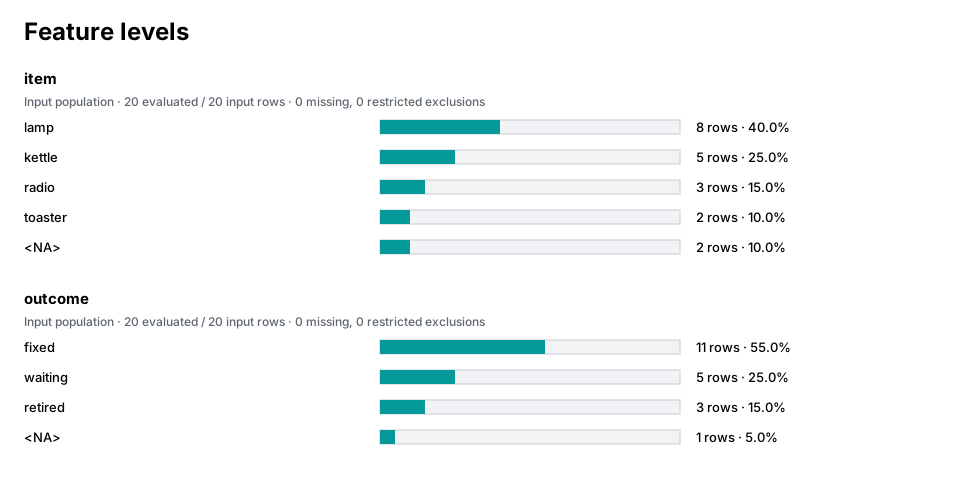
This call returns an SVG string. Save it as levels.svg with the export step below.
Decide what the denominator should mean
Section titled “Decide what the denominator should mean”For bench preparation, all 20 intakes matter, including the unnamed objects.
For a summary of recorded item types, exclude blank item fields. Apply
dropna=True to both features and inspect each feature’s own denominator:
known = fw.levels( intake, features=["item", "outcome"], dropna=True, max_levels=None)for feature in known["per_feature"]: first = feature["levels"][0] print( f"{feature['column']}: denominator={feature['evaluated_rows']}, " f"excluded={feature['missing_excluded_rows']}, " f"leader={first['count']}/{feature['evaluated_rows']} " f"({first['share_of_feature']:.1%})" )item: denominator=18, excluded=2, leader=8/18 (44.4%)outcome: denominator=19, excluded=1, leader=11/19 (57.9%)Lamps still number eight, but their share rises from 40% to 44.4%. The outcome
count still includes the fixed object with no item name, so its denominator is 19. dropna=True here does not first discard every row with any blank field.
Keep recurring categories without losing sight of the rest
Section titled “Keep recurring categories without losing sight of the rest”Suppose the planning note highlights only item categories seen at least three times. The report can be shorter while its shares still refer to all 20 intakes:
recurring = fw.levels( intake, features=["item"], min_count=3, max_levels=None)feature = recurring.to_dict()["per_feature"][0]print( { key: feature[key] for key in [ "levels_total", "levels_reported", "reported_rows", "unreported_rows", ] })print( "Reported share:", f"{sum(level['share_of_feature'] for level in feature['levels']):.0%}",){'levels_total': 5, 'levels_reported': 3, 'reported_rows': 16, 'unreported_rows': 4}Reported share: 80%Lamps, kettles, and radios cover 16 intakes. The four unreported rows are the two toasters and two unnamed objects. The threshold hides those levels from this result; it does not renormalize the three visible shares to 100%.
Separate a top-three request from a two-row output cap
Section titled “Separate a top-three request from a two-row output cap”top_n selects the leading levels; max_levels caps how many selected levels
are emitted. In this single-feature count they can produce identical rows, but
widening the cap cannot undo a narrower selection:
for top_n, max_levels in [(3, 2), (3, None), (2, None)]: limited = fw.levels( intake, features=["item"], top_n=top_n, max_levels=max_levels ) feature = limited.to_dict()["per_feature"][0] counts = [level["count"] for level in feature["levels"]] print( f"top_n={top_n}, max_levels={max_levels}: counts={counts}, unreported={feature['unreported_rows']}" )top_n=3, max_levels=2: counts=[8, 5], unreported=7top_n=3, max_levels=None: counts=[8, 5, 3], unreported=4top_n=2, max_levels=None: counts=[8, 5], unreported=7Removing the output cap reveals the three radios only when the selection admits
them. Each call still counts the 20-row population. unreported_rows includes
all omitted mass, whether caused by the selection or the output cap; rendering a
limited result cannot recover those omitted levels.
For the next session, lamps warrant the most bench space on this evidence. Before reserving specialist volunteers, inspect item-by-outcome counts and the waiting items’ notes: a common item is not automatically the hardest one to repair.
Save the result for sharing
Section titled “Save the result for sharing”Save the figure or report in your working directory:
from pathlib import Path
Path("levels.svg").write_text(svg, encoding="utf-8")
Continue exploring
Section titled “Continue exploring”fw.census, fw.joint_counts, fw.infer_schema. See results and configuration for serialization and result-method contracts.